Table of Contents
Introduction
Learning how to place an Intraday order is an important step for beginners who want to understand short-term stock trading. Intraday trading involves buying and selling a stock within the same trading session. Some traders buy first and sell later, while others open an eligible short position by selling first and buying back later.
However, understanding how to place an Intraday order involves more than tapping the Buy or Sell button. You need to select the correct product type, enter the quantity, choose an order type, review charges, and understand how to close your position.
In this guide, Stock Charcha explains the process for beginners, including how to place intraday orders in Zerodha and how to sell intraday shares in Groww. The aim is to help you understand the order-placement process before risking money in a live market.
What Is an Intraday Order?
An intraday order is intended to open or close a position during the same trading day. Unlike a delivery trade, an intraday position is generally not meant to be held overnight.
For example, if you buy 10 shares of a company in intraday mode and sell those shares later in the same session, you have completed a basic intraday trade. Your actual profit or loss depends on the execution prices and applicable charges.
Before learning how to place an Intraday order, understand your broker’s product labels. On Zerodha Kite, intraday equity orders use MIS, while CNC is used for delivery-based equity orders. Other platforms may use different labels.
You can read Zerodha’s official explanation of CNC, MIS and NRML for more detail.
How to Place an Intraday Order: Step-by-Step
The basic process is similar across many Indian stockbroking apps. The exact interface may differ, so always check your broker’s current instructions.
Step 1: Log In to Your Trading Account
Open your broker’s official app or website and sign in. Check that your account is active and that sufficient funds are available for the trade and its associated costs.
If you are new to mobile trading, first become familiar with the app’s watchlist, order book, holdings, and positions sections. Knowing where these features are located makes it easier to follow how to place an Intraday order without confusing an order with an executed trade.
Step 2: Search for the Stock
Use the search bar to find the company you want to trade. Confirm the company name and exchange, such as NSE or BSE, before selecting the instrument.
Do not choose a stock simply because its price is moving quickly. Consider liquidity, price volatility, market conditions, and whether you understand the risks of trading that stock.
Step 3: Choose Buy or Sell
Select Buy if you want to open a long position, expecting the price to rise. Select Sell if you want to close an existing long position or open an eligible intraday short position.
The correct action depends on your current position. If you already own shares for delivery, selling those holdings is not necessarily the same as opening a short intraday trade.
When learning how to place an Intraday order, check the selected stock, order direction, and product type together before continuing.
Step 4: Select the Intraday Product Type
Find the product-type option in the order window and choose intraday mode if you intend to trade within the session.
On Zerodha, this is generally labelled MIS. Selecting the wrong product type can change how the trade is treated, so never assume that the app has selected the option you intended.
This is one of the most important parts of how to place an Intraday order correctly. Read the product details displayed by your broker before submitting the trade.
Step 5: Enter Quantity and Select an Order Type
Enter the number of shares you intend to trade. Consider the total transaction value and the amount you could lose if the market moves against you.
Common order types include:
- Market order: Attempts to execute at the best available market price. The final price can differ from the displayed price.
- Limit order: Lets you specify the maximum price you will pay when buying or the minimum price you will accept when selling. Execution is not guaranteed.
- Stop-loss order: Uses a trigger to help manage an exit when the market moves against your position. The final execution price may differ from the trigger.
Beginners should understand these differences before deciding how to place an Intraday order. For more information, see Zerodha Varsity’s guide to order types.
Step 6: Review and Submit the Order
Before submitting, confirm:
- The stock and exchange are correct.
- Buy or Sell is selected correctly.
- Intraday mode is selected.
- Quantity and price are correct.
- The order type and trigger price, where applicable, are correct.
- You understand the estimated margin and charges.
After submitting the order, check its status. It may be pending, executed, partially filled, or rejected. Knowing how to place an Intraday order also means knowing how to verify that it was actually executed.
Step 7: Monitor and Close Your Position
Open the Positions section to review an executed trade. Check the quantity, average price, and current profit or loss shown by your broker.
Have an exit plan before entering a trade. Intraday positions generally need to be closed within the trading session, and brokers may apply automatic square-off rules and charges. Confirm your broker’s current timing and policies rather than assuming every platform follows the same schedule.
How to Place an Intraday Order in Zerodha
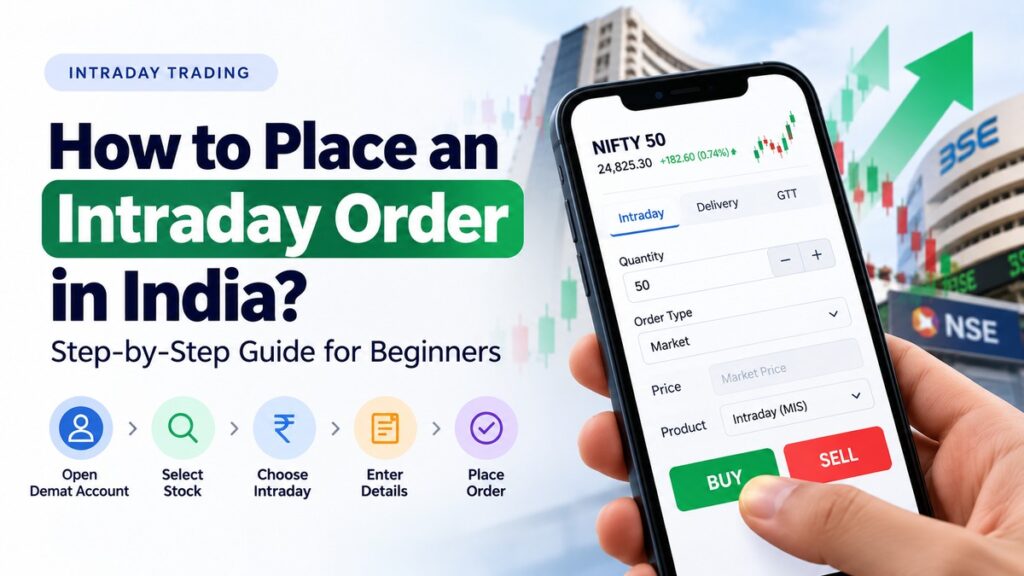
To understand how to place an intraday order in Zerodha, follow these general steps:
- Log in to Kite and search for the stock.
- Select the stock and tap Buy or Sell.
- Choose Intraday MIS as the product type.
- Enter the quantity and select Market, Limit, or another supported order type.
- Review the order details and submit.
- Check the order status and monitor the resulting position.
Zerodha’s official guide, How to place buy or sell orders on Kite, provides instructions for its app and web platform.
The available products and order types can vary by instrument. An order may also be restricted or rejected because of insufficient funds, trading restrictions, or other broker and exchange controls.
How to Sell Intraday Shares in Groww
If you already have an open intraday position on Groww, you generally manage the exit through the Positions section.
- Open the Stocks section.
- Select Positions.
- Choose the position you want to close.
- Tap Exit and review the quantity and price.
- Select Buy or Sell according to the direction of your existing position.
- Confirm the order and check its status.
For the latest instructions, use Groww’s official guide to exiting an intraday position.
When learning how to sell intraday shares in Groww, remember that the exit action depends on whether your position is long or short. Always check the displayed position and quantity before confirming.
Calculate Trading Costs Before You Trade
A trade’s result is not simply the difference between the buying and selling prices. Applicable charges may include brokerage, Securities Transaction Tax (STT), exchange transaction charges, GST, SEBI charges, and stamp duty.
The amount depends on the transaction, instrument, broker tariff, and prevailing rules. Review your broker’s current charges before trading.
Stock Charcha provides a calculator hub where you can explore available financial calculators. Use a relevant calculator if listed to understand costs or estimate a trade’s potential result. For educational purposes, comparing possible outcomes before placing an order can help you understand how charges affect net profit or loss.
Common Mistakes to Avoid
When learning how to place an Intraday order, beginners should avoid these mistakes:
- Selecting the wrong product: Check that intraday mode is selected.
- Ignoring the exit plan: Decide beforehand when you would close the trade and what loss you can tolerate.
- Assuming an order has executed: Check its status and filled quantity.
- Using excessive leverage: Leverage can magnify losses as well as gains.
- Forgetting to square off: Confirm the broker’s intraday closing rules and allow time to exit.
- Ignoring transaction costs: Charges reduce the final result.
- Trading unfamiliar stocks: Low liquidity and sharp price movements can make execution difficult.
Stock Charcha recommends learning the mechanics of orders and risk management before placing live trades. Practice understanding the order window, product type, and position details rather than rushing to enter a market.
Final Thoughts
Understanding how to place an Intraday order requires attention to the stock, product type, quantity, order type, charges, and exit process. Review each detail before submitting an order, and verify execution afterward.
Stock Charcha aims to make financial concepts easier to understand through practical educational guides and calculators. Beginners should focus on understanding risks and trading mechanics instead of assuming that a particular order will produce a profit.
Disclaimer: This article is for general educational purposes only. Stock Charcha is not a SEBI-registered investment adviser and does not provide personalised investment advice. Intraday trading involves significant risk, including the possibility of losing money. Consider your financial circumstances and consult a SEBI-registered investment adviser if you need advice tailored to your needs.
FAQs
How do I place an intraday order for beginners?
Log in to your trading app, search for the stock, and select Buy or Sell. Choose the intraday product type, enter the quantity, select an order type, and review the details before submitting. Check the order status and monitor your position after execution.
How to place an intraday order in Zerodha?
Log in to Zerodha Kite and select the stock you want to trade. Tap Buy or Sell, choose MIS as the intraday product, enter the quantity, and select your preferred order type. Review the details, submit the order, and verify its execution in the Orders section.
How do I sell intraday shares in Groww?
Open Groww and navigate to the Stocks section, then select Positions. Choose the intraday position you want to close, tap Exit, and review the order details. Confirm the transaction and check its status to ensure the position has been closed successfully.
Can I hold an intraday position overnight?
Intraday positions are generally intended to be closed during the same trading session. Brokers may automatically square off open positions according to their policies, which can involve additional charges. Check your broker’s rules and do not assume an intraday position will convert automatically into delivery.
What charges apply to intraday trading in India?
Intraday trading charges may include brokerage, Securities Transaction Tax (STT), exchange transaction charges, GST, SEBI charges, and stamp duty. The total depends on the broker, instrument, and transaction value. Check your broker’s latest tariff and use a suitable tool from the Stock Charcha calculator hub to explore relevant calculations.